Key Takeaways
- Your network is the foundation beneath internet, phones, cameras, payments and every employee device.
- Most business networks have evolved through years of additions, quick fixes and mismatched equipment.
- Unreliable Wi-Fi, poor call quality and unexplained bottlenecks usually trace back to the network, not the internet plan.
- A faster internet connection will not fix a network problem — and frequently gets bought anyway.
- Quality-of-service settings decide whether phone calls survive someone uploading a large file.
- Old cabling and 100 Mbps switch ports cap everything behind them regardless of what you pay for.
- Network segmentation keeps payment terminals, cameras and guest Wi-Fi from sharing one flat network.
- DakotaPro designs, installs, monitors and manages business networks across Southern Arizona.
The part of the business nobody thinks about
A company’s network is the often-forgotten foundation beneath nearly every modern business function. Internet access, cloud applications, phones, payment systems, cameras, printers and every employee device depend on it entirely.
Yet most business networks were never designed. They grew. A switch added when the office expanded. An access point mounted where there happened to be a power socket. Cabling run by whoever was available. A router that came free with a service.
The result is predictable — unreliable Wi-Fi in certain areas, phone calls that break up, recurring bottlenecks nobody can explain, and problems that are genuinely difficult to diagnose because nobody has a complete picture of what is connected to what.
What an Ethernet network actually is, and why it matters
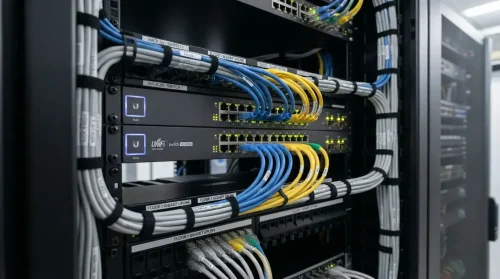
Ethernet is the wired backbone everything else sits on. Wi-Fi access points connect to it. Phones connect to it. Cameras connect to it. Your internet circuit arrives into it.
Which means the quality of that wired layer sets the ceiling for everything above it. A gigabit internet connection arriving into a 100 Mbps switch port delivers 100 Mbps. A modern Wi-Fi access point fed by a decade-old cable run delivers what the cable can carry, not what the access point is capable of.
This is why businesses upgrade their internet plan, notice no difference, and conclude the provider is lying. Frequently the provider is delivering exactly what was sold, and the bottleneck is thirty feet inside the building.
Where networks actually go wrong
Switch capacity. Older switches cap ports at 100 Mbps. Everything behind that port is limited, permanently, regardless of the circuit.
Power over Ethernet. Phones, cameras and wireless access points increasingly draw power through the network cable. A switch without enough PoE budget either refuses devices or drops them intermittently — which looks like a device fault rather than a power one.
Cabling. Cable degrades, gets damaged, and was often never certified in the first place. Hidden wiring problems produce intermittent faults that are close to impossible to trace without testing.
No traffic prioritisation. Without quality-of-service controls, a backup job or a large upload competes equally with a phone call. Whichever grabs capacity first wins, which is why calls break up at unpredictable moments.
One flat network. Payment terminals, security cameras, building systems, guest Wi-Fi and staff laptops all sharing one network means anything compromised has reach across everything.
What designing a network properly involves
It starts with how the business actually operates — what must connect, which applications are most critical, where people work, what the building is made of.
From there the design covers routing, firewalls, managed Ethernet switching, business-grade Wi-Fi, structured cabling and cellular backup connectivity where continuity matters.
Engineering for performance, not just coverage. Quality-of-service controls prioritise phone calls and other business-critical traffic. Switches are selected for the capacity and Power over Ethernet needed by phones, cameras, access points and future expansion — not just what works today.
Cabling gets tested, not assumed. Existing runs are tested; new cables and jacks are professionally installed and certified, so hidden wiring problems do not undermine everything built on top.
Security designed in from the start. Separate network segments isolate administrators, employees, guests, payment terminals, cameras and building systems. Each gets the access it needs without exposing the rest of the business.
The ongoing part
Installation is where most network projects end. It should be where they start.
Centrally managing and monitoring a network means configuration backups exist when hardware fails, software and security updates get applied rather than deferred indefinitely, many problems are resolved remotely before anyone reports them, and emergency replacement hardware is on hand rather than on order.
There is one more benefit that matters more than it sounds. Visibility across both the network and the internet circuit makes it possible to distinguish an internal problem from a provider issue — which ends the finger-pointing that otherwise turns a two-hour fault into a two-day one.
Frequently Asked Questions
Why is my Wi-Fi slow when my internet is fast?
Almost always because the bottleneck is inside the building. Old switch ports, degraded cabling, poorly placed access points and consumer-grade routers all cap performance regardless of the circuit behind them. Test from a computer wired directly into the router — if that is fast, the internal network needs attention.
What is Power over Ethernet and do I need it?
Power over Ethernet delivers electrical power through the network cable, so phones, cameras and wireless access points do not need a separate power outlet. If you are deploying any of those, you need switches with enough PoE capacity — undersizing it causes intermittent faults that look like device failures.
What does network segmentation do?
It separates traffic so different groups cannot reach each other unnecessarily. Guest Wi-Fi, payment terminals, security cameras and staff devices each sit on their own segment. If something is compromised, the damage is contained rather than spreading across everything connected.
How do I know if my network needs redesigning rather than repairing?
If problems recur in different places, if nobody can produce an accurate diagram of what is connected, or if each fault takes days to diagnose, the network has outgrown its design. Repeated repairs on an undesigned network usually cost more over two years than redesigning it once.
About the Author
This article is brought to you by DakotaPro, a locally owned internet and technology provider serving Tucson and Southern Arizona since 1999.
Ask us to assess your network — dakotapro.biz or (520) 745-3900.