Key Takeaways
- Great Wi-Fi is designed, installed and managed — it is not something you buy in a box.
- Wall construction is the most underestimated factor, and Tucson buildings are full of the worst kinds.
- Distance from the access point degrades speed long before the signal disappears entirely.
- Neighboring networks and other devices compete for the same frequencies.
- Congestion is different from coverage — full signal strength and terrible speed is a common combination.
- One access point almost never covers a commercial space properly.
- The access point is only as good as the cable and switch behind it.
- DakotaPro designs, installs and manages business Wi-Fi across Southern Arizona.
Why the dead zone exists
Every office has one. The conference room where calls drop. The corner desk that shows full bars and loads nothing. The warehouse area where the tablet disconnects halfway down an aisle.
The instinct is to buy a better router, or add a range extender, and hope. It rarely works, because the problem is almost never the box — it is the physics between the box and the device, and nobody accounted for it when the equipment was installed.
Wi-Fi is radio. Radio is affected by what is between the transmitter and the receiver, by how far apart they are, and by what else is transmitting nearby. Great Wi-Fi comes from designing around those three things.
1. What your walls are made of
This is the biggest single factor and the one people find hardest to believe.
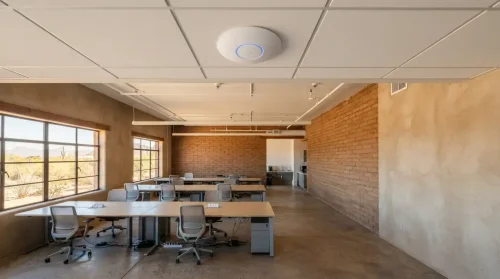
Drywall barely affects a signal. Concrete, brick, adobe and stucco with metal lath absorb an enormous amount of it. Metal studs are worse than wood. Mirrors, metal shelving, foil-backed insulation, filing cabinets and lift shafts all block or reflect signal.
Southern Arizona construction is full of exactly these materials. A building that would need two access points in a drywall-partitioned office may need four in a masonry one — and no amount of extra power on a single unit compensates, because the signal has to physically get through the wall.
Glass is worth a separate mention. Ordinary glass is fine; the coated energy-efficient glazing used across most modern commercial buildings here reflects signal well.
2. Distance
Signal weakens with distance, and speed drops long before the bars do.
A device showing two bars at the far end of a floor may hold a connection while running at a fraction of the speed of one sitting near the access point. Worse, slow devices occupy airtime — one laptop struggling at the edge of coverage can degrade performance for everyone else sharing that access point.
This is why proper design places access points based on a coverage plan rather than on where there happened to be a spare power socket.
3. Interference from everything else
Wi-Fi shares its frequencies with a lot of other equipment, and in a business park you are also sharing them with every neighboring company.
The 2.4 GHz band travels further and penetrates walls better, which also means your neighbors’ networks travel into your space. It is shared with Bluetooth devices, wireless headsets, some cameras, microwaves and cordless phones. In a dense commercial area, 2.4 GHz is often close to unusable during business hours.
The 5 GHz band has far more available channels and much less congestion, but shorter range and worse wall penetration. Getting a business space right normally means using both deliberately — not letting devices pick at random.
4. Congestion, which is not the same as coverage
Full signal strength and terrible performance is an extremely common combination, and it confuses people because everything *looks* fine.
An access point has a finite amount of airtime. Every connected device takes a share. Thirty phones, laptops, tablets, printers and cameras on one access point will perform badly regardless of how strong the signal is — the same way a wide road still jams when enough cars join it.
Coverage problems are solved by placement. Capacity problems are solved by adding access points and distributing devices across them. Diagnosing which one you have is the first step, and guessing wrong means spending money and changing nothing.
5. What is behind the access point
An access point is only as good as what feeds it.
If the cable running to it is old or was never certified, the access point delivers what the cable can carry. If the switch port is 100 Mbps, that is the ceiling for everything connected wirelessly through it. If the switch does not supply enough Power over Ethernet, the access point may run at reduced power or restart intermittently — which presents as random Wi-Fi drops and sends people hunting in entirely the wrong place.
This is why Wi-Fi problems and network problems are usually the same problem.
What a designed installation involves
A proper deployment starts by looking at the building — construction materials, layout, where people actually work, what they connect, and how many devices are realistically in use at once.
From there: access points placed for both coverage and capacity, channels planned so units do not interfere with each other, both bands used deliberately, cabling tested and certified, switching sized for the PoE load, and traffic prioritization so business-critical use takes precedence.
Then it gets monitored. Wi-Fi performance changes as a business changes — new walls, new neighbors, more devices, different working patterns. A network that was right two years ago may not be right now, and centralized management means that gets noticed rather than endured.
Frequently Asked Questions
Why is my office WiFi bad in one specific area?
Usually wall construction or distance from the nearest access point. Concrete, brick, adobe, metal studs and coated glass all absorb or reflect signal heavily, and Southern Arizona buildings commonly use them. Adding a range extender rarely helps — the fix is an access point placed on the far side of the obstruction.
Will a better router fix my WiFi?
Rarely, in a commercial space. A single router of any quality cannot cover a building that needs multiple access points, and it cannot solve congestion caused by too many devices sharing one radio. Replacing the router is the most common Wi-Fi purchase and the least likely to help.
How many access points does an office need?
It depends on square footage, wall construction and device count rather than on any fixed rule. A drywall-partitioned office might need one per 2,000 square feet; a masonry building considerably more. Device density matters as much as area — thirty devices in one room may need more capacity than a large, sparsely used space.
What is the difference between 2.4 GHz and 5 GHz?
2.4 GHz travels further and passes through walls better, but is heavily congested — shared with neighboring networks, Bluetooth, headsets and microwaves. 5 GHz has far more channels and less interference, with shorter range and poorer wall penetration. A well-designed network uses both deliberately rather than leaving devices to choose.
About the Author
This article is brought to you by DakotaPro, a locally owned internet and technology provider serving Tucson and Southern Arizona since 1999.
Ask us to survey your space — dakotapro.biz or (520) 745-3900.